TV Clasica for Android phone: download, install and fix errors
A guide for Android phones and tablets: download the APK, allow installation from your browser or file manager, and review the safety steps before opening the app.
Android mobile guide • Step-by-step installation • Safety tips
Download TV Clasica APK for Mobile
This page summarizes the file information currently available on tvclasica.blog. Version, size, and requirements may change when the APK is updated, so review the details before installing.
Descarga para Android Móvil
Revisa los permisos antes de instalarWhat Is TV Clasica APK for Mobile?
On phones, do not follow Smart TV instructions. The important checks are the right APK file, permission for the browser or file manager, Play Protect warnings and available storage.
This guide is written for mobile users, not for Android TV, Smart TV, TV Box, or Firestick installation.
The app is often distributed outside Google Play, so Android may show security warnings.
Before installing, check the file name, size, requested permissions, and download source.
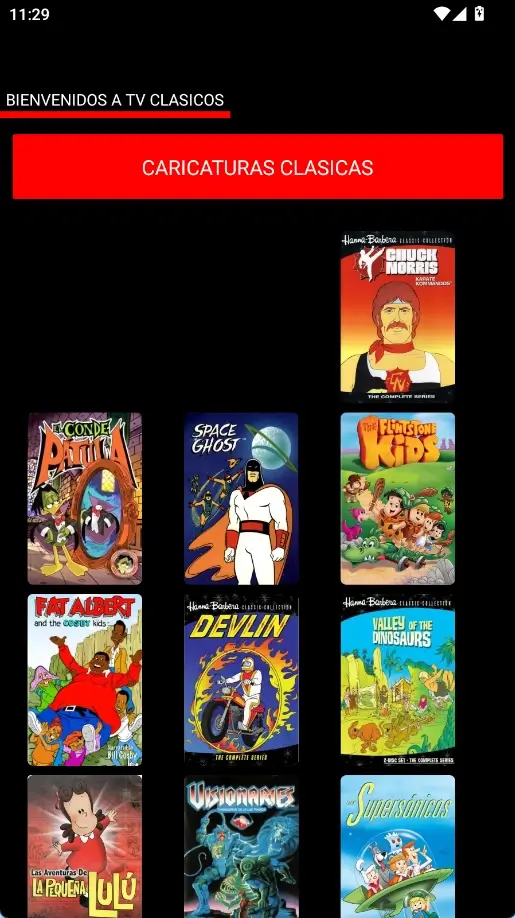
TV Clasica on Android
An illustrative screenshot of the TV Clasica APK interface. The design may vary depending on the installed version and the phone screen size.
Before downloading: phone, tablet or TV
Use this matrix to confirm you are on the right guide and avoid unnecessary permissions.
| Device | What to do | Related guide |
|---|---|---|
| Android phone | Download APK, review permissions and open from Downloads | This page |
| Android tablet | Use the same phone steps and check screen orientation | This page |
| Smart TV / TV Box | Transfer by USB, Wi-Fi or Downloader | /tv-clasica-smart-tv/ |
| Fire TV | Use Downloader with temporary permission | /tv-clasica-downloader/ |
Phone, tablet, or Smart TV: do not mix the steps
TV Clasica for phone intent means Android mobile installation. If your goal is TV Box, Smart TV, or Downloader, use the specific guide to avoid wrong permissions and steps.
Android phone
Download the APK, check Play Protect, allow installation only for the browser or file manager, and open the app from the app drawer.
Android tablet
The flow is similar to phone installation, but check screen orientation, storage, and stable Wi-Fi before updating.
Smart TV or TV Box
Do not follow phone steps for a large-screen install. Use the Smart TV, Downloader, or TVClasica100 TV Box guide for that device.
How to Install TV Clasica APK on Your Android Phone
Download the APK file
Tap the download button from your Android phone. Wait until the file is fully saved in the Downloads folder or appears in your browser notifications.
Allow installation of unknown apps
On Android 8 or newer, go to Settings > Apps > Special app access > Install unknown apps and allow your browser or file manager. On older versions, check Settings > Security > Unknown sources.
Open and install TV Clasica
Tap the downloaded APK, review the installation screen, and press Install. If Android shows a warning, read the reason before continuing.
Turn off the temporary permission
After installation, disable the permission to install unknown apps again to reduce risk from future downloads.
Compatibility on Phones and Tablets
TV Clasica for mobile is intended for Android devices. Real compatibility depends on the APK version, Android version, and the manufacturer's security settings.
Samsung Galaxy
- Android 5.1 or newer recommended
- Installation permission for Chrome or My Files
- Enough free storage to download and install
Xiaomi, Redmi, and POCO
- Review MIUI or HyperOS permission settings
- Allow installation from the file manager you used
- Avoid duplicate or incomplete APK files
Android tablets
- Compatible if the system allows APK installation
- Best experience with stable Wi-Fi
- A larger screen is useful for classic movies and series
If TV Clasica Will Not Install or Open
The APK does not install
Check that the download finished correctly, delete the incomplete file, and download it again using a stable Wi-Fi connection.
Android blocks the installation
Check whether the permission to install unknown apps is missing. If Google Play Protect or the system shows a serious warning, do not ignore it.
The app closes when opened
Clear cache from Settings > Apps > TV Clasica > Storage. If the issue continues, restart the phone or install a compatible version.
Content does not load
Try another Wi-Fi network, temporarily turn off data saver, and make sure the connection is stable enough for streaming.
Safety Tips before Installing
Keep Google Play Protect enabled
Play Protect can review apps installed outside Google Play and warn you if risky behavior is detected.
Review requested permissions
A video app usually needs internet and network access. If you see permissions you do not understand or that do not seem necessary, stop the installation.
Avoid MOD or unlocked versions
Modified APK files may include changes that cannot be verified. To reduce risk, use only files from a source you can recognize.
Respect system warnings
If Android blocks installation for security reasons, the safest option is to follow the warning and avoid forcing the process.
Frequently Asked Questions about TV Clasica for Mobile
Download TV Clasica APK for Mobile
Use the guide above to install TV Clasica on your Android phone with better control over permissions, compatibility, and safety.
DOWNLOAD APK FOR ANDROIDRelated guides
Use the right page for your device to reduce installation errors and find clearer steps.
Important Notice
tvclasica.blog provides information and a download guide for informational purposes. We are not the official developer of TV Clasica APK and do not control the content available inside the app. Users are responsible for checking whether streaming app use is legal in their country and for installing APK files only from sources they consider trustworthy.