TV Clasica for Mac: how to use the APK without a native app
TV Clasica is distributed as an Android APK, not as a native macOS application. On a Mac, you can evaluate an Android emulator or cast from a compatible device, but you should not convert the APK or open unverified DMG, PKG, or app files that borrow its name.
Quick answer: there is no verified native TV Clasica download for Mac
The search for “TV Clasica for Mac” usually combines two jobs: running an Android streaming app on a computer and moving playback to a larger screen. As of August 19, 2026, we could not verify a listing for this TV Clasica app in the Mac App Store or a developer-issued macOS installer. The distribution page used by this site still lists an Android APK: version 100 (external listing reference), 8.5–18.6 MB (external listings), updated May 26, 2026, with Android 5.1 or later required.
That is why this guide does not present a Mac download button. If you need to test the app on a computer, the coherent route is an Android emulator whose publisher explicitly supports your macOS release and processor. If TV Clasica already works on an Android phone or TV box, casting may be simpler and avoids adding a complete virtual Android environment to your Mac.
This page also keeps a clear boundary from the existing PC guide. The PC page targets Windows, Android emulators for Windows, and the query “TV Clasica for Windows.” This guide focuses on macOS decisions: Apple silicon versus Intel, Gatekeeper, emulator compatibility, and misleading DMG or PKG downloads.
Verified facts
Source checked August 19, 2026. The download target is a source page, not a stable verified direct APK URL.
Emulator, casting, or stop: choose before downloading
The right method depends on what you want to do and which Mac you own. This comparison prevents unnecessary software installs and avoids searching for a format the source does not offer.
| Option | When it makes sense | Limit or warning sign |
|---|---|---|
| Android emulator for macOS | You want to run the APK inside Android, inspect categories, and use the Mac as the primary screen. | Confirm that the emulator publisher supports your macOS version and chip. Download only from the publisher's official site. |
| Cast from Android | TV Clasica already works on your phone or tablet and you only want playback on another screen. | The app, local network, and receiving device must all support casting; availability is not guaranteed. |
| Use Android TV or a TV box | Your actual goal is regular television viewing with a remote and without keeping the Mac awake. | Follow the Smart TV or TV box guide and do not mix macOS security settings with Android install permissions. |
| Search for a DMG or PKG | This is not recommended because no native distribution was verified. | Stop if a file hides its extension, asks you to disable Gatekeeper, or promises a premium or modified edition. |
How to use TV Clasica APK on Mac step by step
This workflow keeps the APK inside Android. It does not convert the package, does not require turning off macOS security globally, and can be removed if the test fails.
Identify your Mac model and macOS release
Open About This Mac and note whether the computer uses Apple silicon or Intel, then record the macOS version. Those details determine which emulators can install and how much memory remains available for video playback.
Choose an emulator with published support
Use the emulator publisher's official compatibility and requirements pages. Avoid download collections, repackaged installers, and pages that use the TV Clasica name to distribute their own DMG file.
Keep macOS protections enabled
Install only software that is signed or clearly documented by its publisher. Gatekeeper may warn about an unidentified developer. Do not click Open Anyway as a routine step; cancel when the origin cannot be verified.
Get the APK through the checked source page
The tvclasica.blog homepage links to an external listing that currently shows version 100 (external listing reference), 8.5–18.6 MB (external listings), and Android 5.1+. Compare those details before continuing. Because there is no stable verified file URL, this guide does not invent a direct download.
Import the APK into Android
Use the emulator's Install APK command or drag the file into its Android area if the publisher documents that workflow. The package must open within Android; macOS should never try to execute it as a desktop application.
Run a short playback test
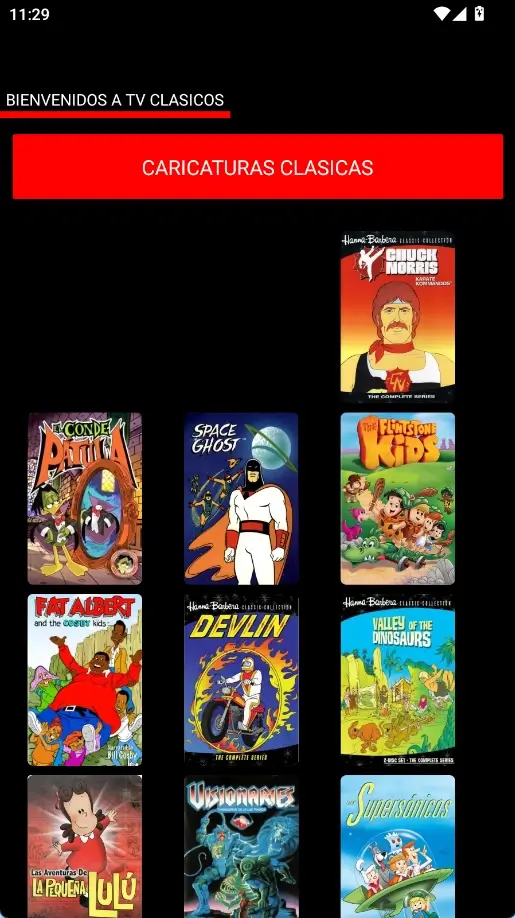
Open TV Clasica, compare its layout with the reference screenshots, and try a short item. Check video, audio, pointer controls, and Mac temperature before committing to longer sessions.
Remove unnecessary files and permissions
If the test fails, uninstall the app from Android and remove the emulator using the publisher's instructions. Delete duplicate APK files and do not keep installers from sources you cannot trace.
Recognize the Android interface before testing on Mac
These real app captures already used by the site show Android states. They are visual reference points, not images of a native Mac version, and the catalog or layout may change between releases.

Practical requirements and limitations on Mac
Supported processor
Do not assume that an Intel emulator works identically on Apple silicon. Read the publisher's supported hardware and release notes.
Memory and storage
The emulator needs much more space than the APK. Leave room for virtual Android, cache, and video, and close heavy applications during a test.
Stable network
A successful install does not fix service interruptions. Test another network and one short item before blaming every failure on the emulator.
Gatekeeper enabled
Do not disable macOS protection globally for a questionable installer. A warning combined with an untraceable source is a reason to stop.
Non-touch controls
The app was designed for Android. A mouse, trackpad, and keyboard may not reproduce every touch or television control.
Content and legality
The availability of channels or films does not prove they are licensed in your country. Check local rules and prefer authorized services.
Common TV Clasica problems on Mac
The emulator will not install
Verify processor, macOS release, free space, and official requirements. Do not grab another copy from a random mirror; use a compatible provider or cast from Android.
The APK appears as an unknown file
macOS is not supposed to execute an APK. Import it from inside the emulator. Delete files ending in .dmg.exe, .pkg, or suspicious double extensions.
The app opens but video fails
Try another item, restart virtual Android, and check network, audio, and graphics acceleration. If the same failure occurs on real Android, it is probably not Mac-specific.
The app demands an update
Compare version, date, size, and source again. Do not install an update offered by a pop-up when its origin cannot be verified.
The Mac becomes hot or slow
Lower emulator resolution, close heavy processes, and shorten the session. For frequent television use, a dedicated Android device is usually more efficient.
Gatekeeper blocks the emulator
Check the publisher site and signature first. Apple recommends App Store or identified-developer software; do not override the warning merely to finish this guide.
Frequently asked questions about TV Clasica for Mac
Sources checked
- TV CLASICA listing on Aptoide — external source used to compare version 100 (external listing reference), date, size, and Android requirement; it is not an official developer source.
- Apple: safely open apps on Mac — official guidance on Gatekeeper, signatures, and unverified software.
- Apple: use iPhone and iPad apps on Apple silicon Macs — explains that only supported App Store apps appear as available for Mac use.
Check the Android listing first
The homepage maintains version details and the external source link. It does not offer a native Mac installer.
Return to the TV Clasica APK listingImportant notice
tvclasica.blog is an independent informational guide and is not the official TV Clasica developer. We do not guarantee availability, safety, legality, or content operation. Verify software origin, keep macOS protections enabled, and use services authorized in your jurisdiction.